Home › School bus tracking system › School bus tracking software your transport office will actu
School bus tracking software your transport office will actually use
Hardware puts a dot on a map. Software decides whether that dot becomes useful. For the person running school transport, the real product is the screen they open every morning: who is on the road, who is late, which child has not boarded, and what to tell the parent on the phone.
Satcop pairs its India-made GPS trackers with its own software platform, the same one behind My School Ride at 200+ schools, 10,000+ buses and 200,000+ students. Below is a plain walk-through of what the software does, screen by screen, and what to test before choosing any package.
The admin dashboard
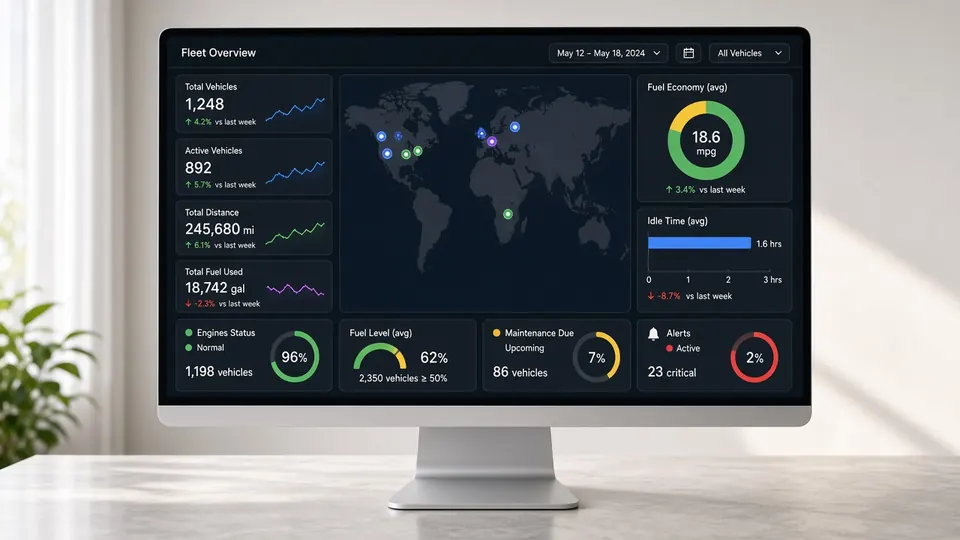
The dashboard is a live fleet view. Each bus appears with its route name, last update time and current trip status. Click a bus and you see its stop list, the students assigned to it and the trip so far. A search box takes you straight to a student, a bus number or a driver.
Useful details our users point to:
- colour states that show at a glance whether a bus has started, is on its way, or has finished;
- trip playback to replay any past journey on the map, minute by minute;
- one login across several campuses, with each branch able to see only its own buses if you prefer.
Routes, stops and students as data
Good software treats routes as editable data rather than a fixed setup done once by the vendor. In our platform the transport office can:
- add or move a stop on the map and reorder the sequence;
- assign or shift a student between buses when families relocate;
- clone a route for exam-day or half-day timetables;
- attach an attendant and a driver to each trip.
For the planning side (designing routes from scratch and cutting kilometres), see our route optimisation software page.
Attendance records linked to trips
When buses carry RFID readers, every card tap lands in the software against the bus, the stop and the time. The transport office can list children who boarded in the morning but did not tap out in the afternoon, or see which stop a child really uses. The hardware side is explained on RFID attendance for schools.
Apps for parents and drivers
The software feeds two mobile apps:
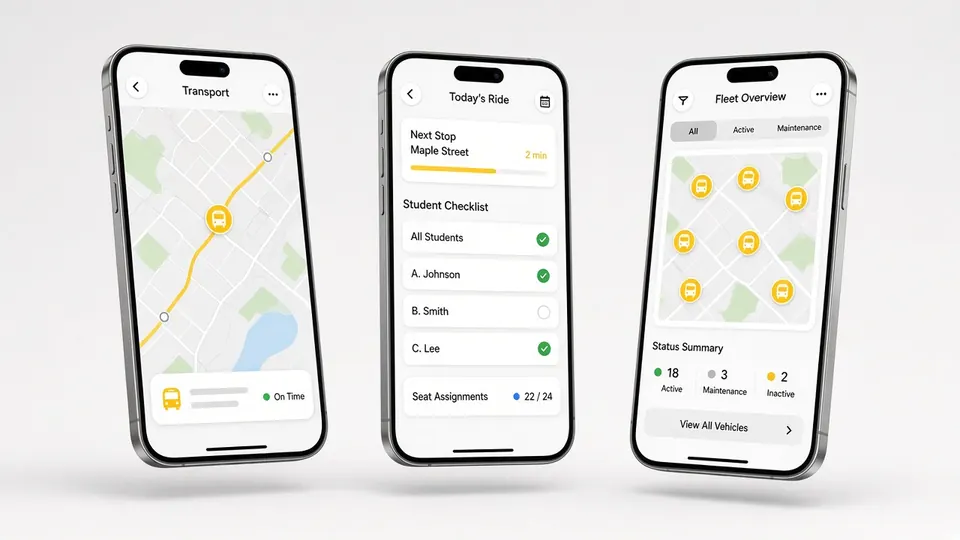
- Parent app (My School Ride): live bus position, an alert when the bus is near the stop, and boarding and drop messages. One login covers siblings on different buses.
- Driver app: today's trip, stop order, the student list and navigation, so drivers rely less on memory and calls. More on our driver app page.
Reports without spreadsheets
Instead of a clerk compiling registers, the software produces automated reports: trip timing, distance per bus, stop-wise attendance, and history for any date range. Reports export for management meetings or for sharing with a bus contractor. Schools that outsource buses use the same views for contractor monitoring.
Video alongside location
If cameras are fitted, footage connects to the same bus record, so a complaint about a specific trip can be checked by date and bus. See school bus CCTV camera.
Software-only or software with hardware?
Some vendors sell software that runs on a driver's phone. It works until the phone leaves with the driver or the battery dies. We supply the software with a wired 4G tracker so data keeps coming whoever drives. The comparison is set out in our article on GPS device vs phone tracking.
Questions to ask in any software demo
- Show me last Tuesday's trip for one bus, replayed. How long does it take to find?
- Move a stop and add a new student while I watch.
- How does a parent with two children on two buses see both?
- What happens on the map when the bus enters a poor network area?
- Which reports can I export, and in what format?
- Who trains my staff, and who do I call in month six?
Any vendor that hesitates on these is selling a brochure, not a working tool.
Data and access
Each user role sees only what it needs. Parents see their own child's bus. Drivers see their trip. The transport office sees the fleet. Management sees summaries. Access is given and removed by the school admin.
A morning in the transport office, with and without software
Without a platform, the transport coordinator starts the day with a phone in each hand. A parent rings about route 7. The coordinator rings the driver, who is driving and does not pick up. Ten minutes later the answer comes back, and by then three more parents have called. Registers are filled on paper and typed up on Friday, if at all.
With the software open on one screen, the same coordinator sees route 7 is stuck at a railway crossing, tells the parent the bus is six minutes away, and moves on. Attendance has already arrived from the card readers. At the end of the week, the report exists without anyone typing it. The difference is not a feature list; it is hours handed back to a small team every single week.
Rolling out the software
Setup is done with your team, not for it. We import routes, stops and student lists from your spreadsheets, check them on the map with your transport head, then train office staff in short hands-on sessions. Parents receive a simple guide for the My School Ride app. During the first weeks we watch alerts and stop positions closely and correct anything that looks wrong.
Where to go next
- The full system overview: school bus tracking system
- Operations and administration: school transport management system
- Planning help: school transport management guide
Offices in Pune (Kharadi) and Hyderabad (Gachibowli); anywhere else, we serve and demo in your city.
Book a demo
We will load a sample of your routes and walk your transport team through the dashboard. Call +91 86000 02222 or WhatsApp +91 91560 88090 (wa.me/919156088090).
Frequently asked questions
Is the software cloud-based?
Yes. The dashboard opens in a web browser, and parents and drivers use mobile apps.
Can several campuses use one account?
Yes. A school group can see all branches together or limit each branch to its own buses.
Can our team edit routes ourselves?
Yes. Stops, sequences, student assignments and trip copies can be changed by the transport office.
Does the software work without your hardware?
We supply it with our 4G GPS tracker, because a fixed device gives steadier data than a driver's phone.
What reports are included?
Automated reports on trips, timings, distance and stop-wise attendance, exportable for any date range.
More from Satcop
Get a written quote
Share your city, bus count and the parts you want. We will WhatsApp you back with a quote path.
Let's talk.
We visit and demo in your city. Ask for a quote.
WhatsApp +91 91560 88090 · Head Office · Nyati Enthral, Kharadi, Pune 411014