Home › School bus blog › School transport management software: what to look for beyond live tracking
School transport management software: what to look for beyond live tracking
A dot on a map tells you where a bus is. Running school transport well needs much more: who rides which bus, which stops are visited, which papers expire next month, and what to tell parents when plans change.
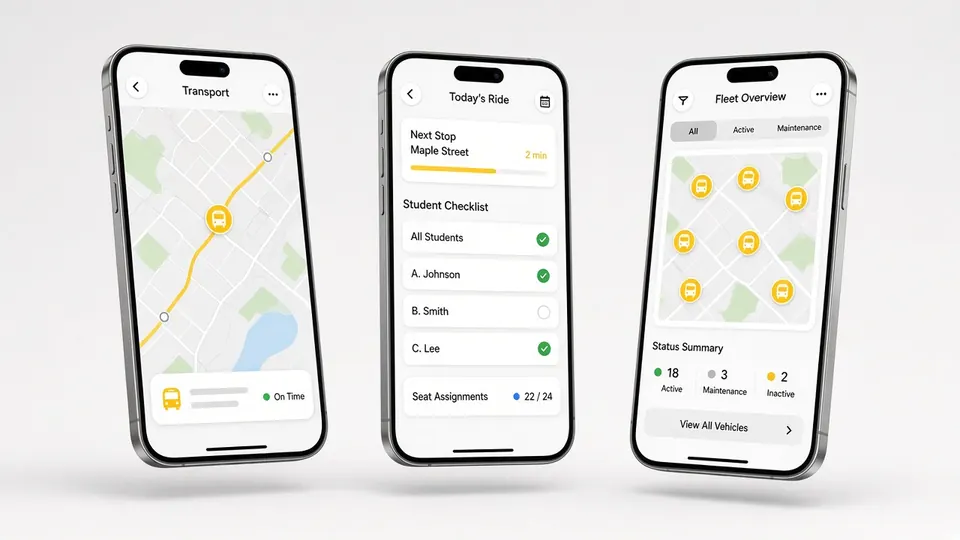
Related product: school transport management system
Many schools start with live GPS tracking because it answers the most urgent parent question: where is the bus? After a few months, the transport office usually discovers that tracking alone does not reduce its workload much. Allocating students, changing stops, chasing attendance, reminding contractors about permits and messaging parents still take hours every week. That is the work school transport management software is supposed to handle. This guide explains what to look for, in plain terms, so you can tell a full system from a map with extras.
1. A live view of the whole fleet
The starting point is still the live dashboard: every bus on one screen, updated every few seconds from a fitted tracker. But look at what else the dashboard shows. Can the transport manager see all pickup and drop points? Can they see which stops a bus has visited and which it has missed on the current trip? Can they spot a bus that has gone the wrong way? A dashboard that only shows moving dots leaves the manager guessing.
2. Stops and routes the school can edit
Families move, new students join and roads change. Software that needs the vendor to change a stop will always lag behind reality. Look for a system where the transport manager can add, move and remove stops, change the pickup order and see the result on the map straight away, with the driver app updating to match. Our route optimisation page shows how this works in Satcop's system.
3. Student allocation
Every student who uses transport should be assigned to a bus and a stop, and the driver or attendant should see that list in pickup order. When a student changes bus mid-year, the change should take a minute, not a spreadsheet and three phone calls. Ask how allocation is done, who can change it, and whether parents see the change in their app.
4. Attendance that is recorded, not assumed
Knowing that a bus reached school is not the same as knowing every child on the list was on it. RFID card readers on the bus record each boarding and drop-off; an attendant can mark attendance in the app where cards are not used. UHF readers at the school gate can record arrival on campus. When bus and gate records come together, the office can follow up on a missing child early. See our RFID attendance page.
5. Communication with parents
A transport system should give the school one channel to parents, instead of WhatsApp groups run by individual drivers. Look for announcements from the transport manager to all parents or to a single route, leave requests that reach the attendant before the bus arrives, and a parent app with a live map, ETA and arrival alerts. Multi-language support helps parents who are not comfortable reading English.
6. Vehicles and documents
Every bus carries papers with expiry dates. Missing a renewal can take a bus off the road at short notice. Good software records vehicle documents and sends alerts before they expire. It should also keep basic maintenance records, so the transport manager can plan servicing without taking buses off routes at the worst time. In Satcop's admin console, vehicle document expiry alerts and trip and cost records are part of the system.
7. Alerts that reach the right people
Alerts are useful only if each goes to the person who can act on it. Parents need journey alerts: the bus is near, the child boarded, the child was dropped. Staff need operational alerts: an SOS from a driver or attendant, a bus going the wrong way, a missed stop. Ask any vendor to show the list of alerts and who receives each one. Our post on school bus alerts goes into detail.
8. History and reports
The real value of a transport system shows up at the end of the term, when the team looks back. Trip history and playback show how long each route really took, which stops were missed and how often buses arrived after the bell. That is the evidence for changing routes, adding a bus or speaking to a contractor. Without history, every decision is based on memory and complaints.
9. Contracted buses and vans
Few schools run a single, uniform fleet. Many use contracted buses, and many families use vans. Ask whether those vehicles can be tracked on the same dashboard and included in allocation, attendance and alerts. See our pages on contractor monitoring and school van tracking.
10. Cameras, if you want them
Cabin cameras and dashcams are optional, but if a school plans to add them, it helps if they connect to the same system so footage can be linked to the bus location and time. Ask where footage is stored and how access is controlled. See our school bus CCTV camera page.
What transport management software is not
School transport software is not a full school management suite, and it should not try to be. It does not need to run admissions, exams or the timetable. A focused system that does transport well, and exchanges data with the school's other tools when needed, is usually better than a large suite where transport is a minor module. When comparing products, keep the conversation on the transport jobs listed above.
A quick scorecard
| Area | Basic tracking app | Full transport management |
|---|---|---|
| Live map | Yes | Yes, with stops, visited and missed stops |
| Stops and routes | Often set by the vendor | Edited by the school, synced to drivers |
| Student allocation | Limited | Per bus and stop, changed in minutes |
| Attendance | Manual, if any | RFID on the bus, optional gate readers |
| Parent communication | Map only | Announcements, leave, alerts, call driver |
| Documents | No | Expiry alerts and records |
| History | Short or none | Trip history and playback |
Questions for the demo
A demo is the best test of transport software, provided the school drives it rather than the vendor. Ask the vendor to move a student from one bus to another while you watch, and show how the driver's list changes. Ask them to add a stop and show it on the parent's map. Ask what the transport manager sees when a bus misses a stop, and how a document reminder looks. Ask how a parent applies for leave and how the attendant sees it. Each of these takes a minute in a good system and much longer in a weak one, and none of them can be faked with a slide.
Where to start
Write down the five transport jobs that take your office the most time today, and ask each vendor to show exactly how their system handles them. Then see Satcop's school transport management system, and book a demo with your transport manager in the room.
Frequently asked questions
Is school transport management software the same as GPS tracking?
No. Tracking shows where buses are. Transport management also covers stops, student allocation, attendance, parent communication, documents and trip history.
Can the school edit stops and routes itself?
In Satcop's system, yes. The transport manager can change stops and pickup order, and the driver app updates to match.
Does it track vehicle documents?
Yes. Satcop's admin console sends vehicle document expiry alerts and keeps trip and cost records.
Can contracted buses and vans be included?
Yes. They can be fitted with trackers and managed on the same dashboard.
Is this a full school management system?
No. It focuses on transport. It does not run admissions, exams or timetables.
More guides
Want to see it on your buses?
Share your school, city and bus count. We will WhatsApp you back.
Let's talk.
We visit and demo in your city. Ask for a quote.
WhatsApp +91 91560 88090 · Head Office · Nyati Enthral, Kharadi, Pune 411014