Home › School bus blog › Dome camera vs dashcam: which does a school bus need?
Dome camera vs dashcam: which does a school bus need?
A dashcam and a dome camera look similar on a quote, but they watch completely different things. Here is what each one does, and how to decide what to put on your buses.
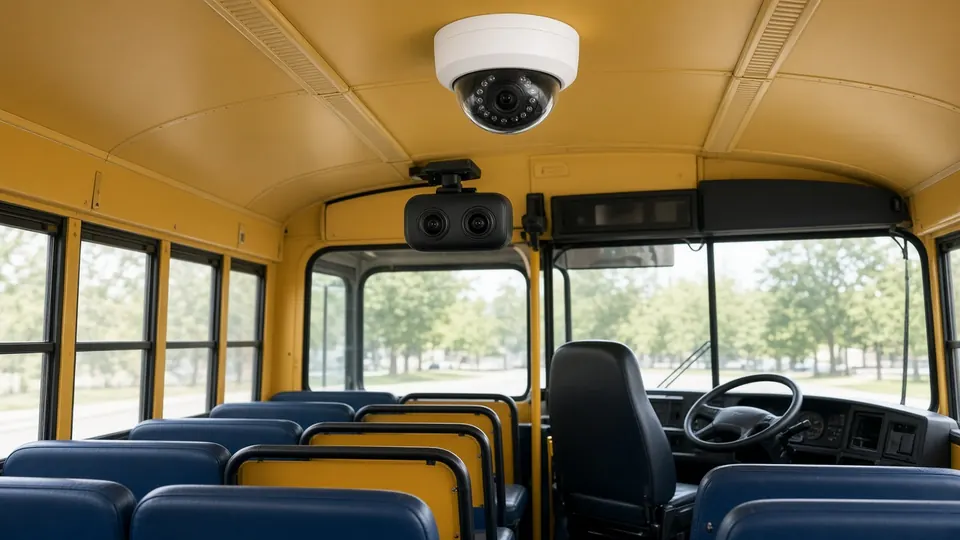
Related product: school bus CCTV camera
When a school decides to add cameras to its buses, the first quote often lists "CCTV" or "camera" without saying which kind. That matters, because the two common types answer different questions. A dashcam answers "what happened on the road?" A dome camera answers "what happened inside the bus?" Most schools need both answers at some point. This guide explains the difference, the options worth paying for, and the policies to settle before the first recording.
What a dashcam does
A dashcam is mounted at the front of the bus, near the windscreen, and points forward at the road. It records what the driver sees: traffic, signals, pedestrians and other vehicles. A wide-angle lens captures more of the road edges and side lanes.
A dashcam is useful when:
- a parent or member of the public complains about how the bus was driven;
- there is a collision or near miss and the school needs to know what happened;
- the school wants to coach drivers using real examples.
What a dashcam cannot do is show the children. It sees nothing behind the driver's seat.
What a dome camera does
A dome camera is mounted on the ceiling of the cabin. Its rounded housing is hard to knock out of position and makes it obvious, which is part of the point: children and adults behave differently when they can see a camera. It covers the seats, the aisle and often the door.
A dome camera is useful when:
- a parent reports bullying, a fight or an injury on the bus;
- something goes missing or gets damaged;
- the school wants to check that the attendant is doing their job;
- a younger child's parents simply want to know the cabin is watched.
For buses that run in the dark, such as winter mornings or late returns from events, the dome camera should have IR night vision. Satcop's 4G dome cameras use IR LEDs for this.
Side by side
| Dashcam | Dome camera | |
|---|---|---|
| Where it goes | Front, near the windscreen | Cabin ceiling |
| What it sees | The road ahead | Seats, aisle, door |
| Main questions it answers | How was the bus driven? What caused the incident? | What happened between students? Was the attendant present? |
| Night use | Road lit by headlights and street lights | Needs IR night vision in a dark cabin |
| Deterrent effect | Mainly on the driver | On students and staff in the cabin |
So which one?
For most schools, the honest answer is both. A typical set-up is one dome camera in the cabin and one dashcam facing the road. Then consider:
- A second dome camera on long buses, where one camera cannot see the back rows clearly.
- Driver monitoring if the school has concerns about driver fatigue or phone use. A driver monitoring system (DMS) camera watches the driver's seat.
- Two-way audio if staff want to speak to the cabin from the office.
If the budget only allows one camera per bus at first, think about which complaints the school actually gets. If most are about behaviour on board, start with a dome camera. If most are about driving, start with a dashcam. Plan to add the other later.
Recording, storage and the live feed
Cameras are only useful if the footage exists when you need it. Three questions decide that.
Where is footage stored?
On a recorder in the bus, in the cloud, or both. On-device storage keeps working when the bus is out of signal. Cloud storage means footage survives even if the device is damaged, and it is easier to retrieve without going to the bus. Satcop offers cloud and/or on-device recording, depending on the set-up.
How long is it kept?
Complaints often arrive days after the event. If footage is overwritten too soon, it is gone. Decide how long the school needs to keep recordings, and check that the storage plan matches.
Is there a live feed?
A live 4G feed lets authorised staff watch the cabin in real time, and in some packages parents too. It is useful when an SOS comes in. It also uses more data, and its availability depends on the package. Satcop confirms whether the live feed is included at the demo.
Linking video to location
Footage is much easier to use when it is tied to the bus's GPS record. When a parent says "something happened near the market stop on Tuesday afternoon," the school can find that point in the trip history and go straight to the clip. Event marking helps too: a marked event becomes a bookmark in hours of recording. Satcop's cameras run on the same system as its school bus GPS device, so video comes with location context. The system can flag unusual activity such as speeding, unauthorised stops and route deviations.
Privacy and access: decide before you record
Cameras on a school bus record children. Before the first bus goes out, agree in writing:
- Who can watch live (for example, the transport manager and principal only).
- Who can view recordings, and on what grounds (a complaint, an incident report).
- Who can download or share a clip, and how that is logged.
- How long recordings are kept before they are overwritten.
- What parents are told about the cameras, and how a parent can ask to see footage involving their child.
Satcop keeps footage for authorised access only. The school decides who is authorised.
Mistakes schools make with bus cameras
- Nobody checks that they record. A camera that stopped recording weeks ago is only discovered after an incident. Make "cameras recording" part of the daily depot check.
- Footage is overwritten too soon. Complaints often come days later. Match storage to how quickly complaints actually reach the school.
- Too many people have access. Every extra login is a privacy risk. Keep the list short and review it each term.
- The camera points at the wrong place. A dome camera that cannot see the back rows or the door misses the moments that matter. Check the view on each bus after installation.
- Cameras replace supervision. A camera records what happened. It does not stop it. The attendant is still the first line of safety.
Buying checklist
- Does the quote say "dome camera" and "dashcam" separately, with the count for each bus?
- Do the cabin cameras have night vision?
- Is the dashcam wide-angle?
- Where is footage stored, and for how long?
- Is a live feed included, and who can see it?
- Is video linked to the GPS trip history?
- Who installs the cameras, and who fixes them when they fail?
- Does the quote list cameras, installation, storage, support and GST separately?
Next steps
See Satcop's school bus CCTV cameras for the full camera kit, or the school bus tracking system to see how cameras fit with GPS, attendance and alerts.
Frequently asked questions
Is a dashcam enough for a school bus?
A dashcam records the road, not the cabin. To see what happens between students, a school needs a dome camera inside the bus.
How many cameras does a school bus need?
A common set-up is one dome camera in the cabin and one dashcam facing the road. Long buses may need a second dome camera, and some schools add driver monitoring.
Do school bus cameras work at night?
Satcop's 4G dome cameras use IR LEDs for night vision, so the cabin is recorded on dark mornings and evenings.
Can parents watch the bus camera live?
A live 4G feed is available where enabled. It depends on the school package, and who can see it is decided by the school.
More guides
Want to see it on your buses?
Share your school, city and bus count. We will WhatsApp you back.
Let's talk.
We visit and demo in your city. Ask for a quote.
WhatsApp +91 91560 88090 · Head Office · Nyati Enthral, Kharadi, Pune 411014