Home › School bus blog › School bus tracking in Hyderabad: a six-week rollout before the June session
School bus tracking in Hyderabad: a six-week rollout before the June session
Hyderabad schools reopen in June, often just as the heat breaks and the first rains arrive. The weeks before that are the best window to put tracking on every bus.
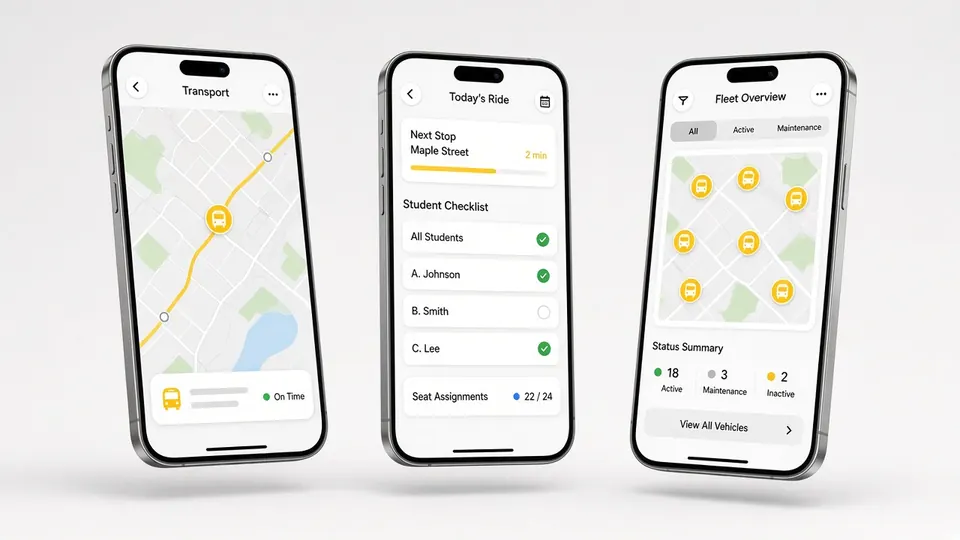
Related product: school bus GPS tracking in Hyderabad
Most schools that add tracking in the middle of a term wish they had done it before the term began. Drivers are learning new routes, parents are learning the app, and the transport office is answering calls about both at once. In Hyderabad, where the academic year starts in June, there is a natural window in April and May to get everything ready. This guide sets out a six-week rollout plan, based on how we work with Hyderabad schools from our office at Vasavi Sky City in Gachibowli.
Why Hyderabad routes need planning
Hyderabad's school map has stretched. Many large campuses now sit beyond the Outer Ring Road, in places like Kollur, Tellapur, Gandipet, Shankarpally and the Shamshabad side, while others are in the IT corridor around Gachibowli, Kondapur and Madhapur. Families live everywhere from Secunderabad and Kukatpally to Manikonda and the old city. A campus near the ORR may run buses to five or six very different parts of the city, each with its own traffic pattern. That is why the plan below spends so much time on stops and routes before any device is fitted.
Week 1: Agree the scope
Decide what you want the system to do in year one. Most schools start with a 4G GPS tracker on every bus, the parent app and the driver app. Many add RFID card readers on the bus from the start, because attendance is the feature parents value most after the live map. Cabin cameras and UHF gate readers can come in the first phase or later. Settle the scope now so the rest of the plan does not keep changing.
This is also the week for the demo. Because we have an office in Gachibowli, Hyderabad schools can see the devices and apps without waiting for a team to travel from another city.
Week 2: Collect data
- Student addresses and bus users. Confirm which students will use school transport in the new session.
- Vehicles. List every bus with its registration, seating capacity and document expiry dates.
- Staff. List drivers and attendants with their phone numbers. The driver and attendant app runs on their phones.
Clean data now saves weeks of corrections later. The most common problem we see is an old address for a family that moved during the summer.
Week 3: Map stops and draft routes
Put every stop on the map and group them into routes. For campuses beyond the ORR, look hard at where each route enters the ring road and which exit it uses, because those points decide the timing. Set pickup order so the first child picked up does not spend an unreasonable time on the bus. Our route optimisation tools let the transport manager see all stops at once and move them between buses.
Week 4: Fit the devices
Our team fits the GPS trackers, and the RFID readers and cameras if chosen, on each bus. Fitting is planned around the buses' summer schedule, so vehicles that are on summer camp duty can be done on another day. Each device is tested on the dashboard before the bus goes back into service.
Week 5: Train staff
Training is where rollouts succeed or fail. We train three groups:
- Drivers and attendants: starting a trip, following the pickup order, marking attendance, and when to use the SOS that alerts the school admin.
- The transport manager: the live dashboard, stops, bus allocation, visited and missed stops, announcements and documents.
- The admin office: student allocation, calling parents, document expiry alerts and trip records.
Run at least one practice trip per route with the real driver, before the first school day.
Week 6: Bring parents on board
Send parents a short note explaining how to install the app, what the alerts mean and how to apply for leave. Hold a short session at the orientation day. Tell parents that the arrival alert comes when the bus is about 2 km away, and that the map refreshes every few seconds. The app supports multiple languages, which helps the many Hyderabad families who prefer Telugu, Hindi or Urdu to English for everyday use.
The first weeks of the session
June brings the heat's last days and the first monsoon showers. Expect some routes to run long. Do not redesign routes in the first fortnight; instead, let trip history build up, then review it after a month. Look at which stops are consistently late and whether any stop is regularly missed. Use announcements, not individual calls, when a whole route is delayed. Keep a simple log of every issue raised in the first month, with the date, route and what was done. By the end of June that log becomes the list of fixes for the next term, and it shows the management that the rollout is being handled carefully.
Common mistakes to avoid
- Fitting devices before stops and routes are agreed, then reworking everything.
- Skipping driver training because "the app is simple". It is simple, but drivers need to practise it on their own route.
- Inviting parents to the app before the data is clean, so their first experience is a wrong stop.
- Letting every alert go to everyone. Parents need journey alerts; staff need operational alerts.
Questions to settle with the management before week 1
A rollout runs more smoothly when a few policy questions are answered at the start rather than in the middle. Who in the school owns the transport data? Who may call parents about a delayed bus, and who may not? Will board alerts go to every parent from day one, or only to families who ask? If the school adds cabin cameras, who can view the footage and for how long is it kept? How will the school handle a parent who refuses to use the app? None of these questions are technical, and none can be answered by a vendor. Writing the answers on one page and sharing it with the transport team saves many awkward conversations once buses are running.
It also helps to choose one person as the project lead for the six weeks. Rollouts that have a named lead finish on time far more often than those run by a committee.
How we support Hyderabad schools
We serve Hyderabad schools from our office in Gachibowli, with our head office in Kharadi, Pune behind it. That means demos, fitting, training and follow-up visits are handled close to home, and support runs on WhatsApp and phone. Visit our Hyderabad school bus GPS tracking page to book a demo, or read about our transport management system. Schools on the east coast can see our Visakhapatnam page.
Frequently asked questions
When should a Hyderabad school start setting up bus tracking?
Ideally about six weeks before the June session, so stops, devices, training and the parent app are ready on the first day.
Where is Satcop's Hyderabad office?
Our Hyderabad office is at Vasavi Sky City, Gachibowli Circle, Telecom Nagar, Gachibowli, Hyderabad, Telangana 500081. Our head office is in Kharadi, Pune.
Do drivers need smartphones?
Yes. The driver and attendant app runs on a phone and shows the trip, students in pickup order, attendance marking and the SOS.
Can parents use the app in languages other than English?
Yes. The parent app supports multiple languages.
Should we change routes in the first week of term?
Only to fix clear problems. Let trip history build up for about a month, then review routes with real data.
More guides
Want to see it on your buses?
Share your school, city and bus count. We will WhatsApp you back.
Let's talk.
We visit and demo in your city. Ask for a quote.
WhatsApp +91 91560 88090 · Head Office · Nyati Enthral, Kharadi, Pune 411014